


Type plate, model number, serial number: How to find the right spare part without making a mistake
A faulty electrical appliance is annoying, but it is even more frustrating when the replacement part you ordered doesn’t fit in the end. Especially with washing machines, refrigerators, vacuum cleaners, or battery-powered devices, wrong purchases happen again and again, even though the brand and product name seem correct. The reason: modern electrical appliances often differ more than you might assume at first glance. Anyone who wants to find the right replacement part needs to take a closer look.
In this blog post, you’ll learn why the model number, serial number, and rating plate are crucial, where to find this information, and how to make sure the replacement part is truly compatible.
Why brand and product name don’t always suffice
Many consumers start their search for replacement parts intuitively: they enter the brand and device name into the search and hope to find what they need quickly. Unfortunately, this approach is often inaccurate. Manufacturers frequently sell devices for several years under the same model designation. Internally, however, components, suppliers, or technical specifications change.
A motor may be replaced by a successor model, connectors may change, or electronic components may be modified. As a user, you can’t see this from the outside. That’s why it’s risky to rely only on the device name. Instead, you should buy replacement parts based on the model number, because only then can variants be clearly distinguished and you can buy a compatible replacement part that really fits.
The difference between the rating plate, model number, and serial number
Before you start searching for replacement parts, you should understand what information exists and how it relates. Our explanation helps you avoid misinterpretations.
Where can I find the rating plate on the device?
The rating plate is the key to a successful spare-part search. It bundles all information: model number, serial number, and often additional technical data. This saves you time and helps you avoid wrong purchases.
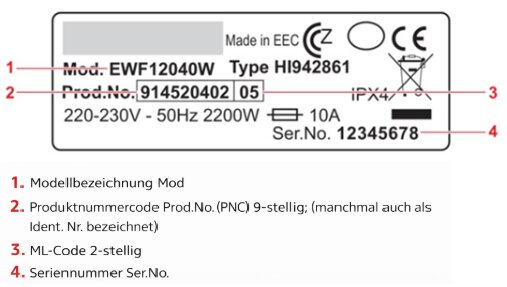
Finding the rating plate: examples for different devices
- Washing machine: usually located on the door frame or on the inside of the door. That’s where you’ll find the rating plate of your washing machine with all relevant details.
- Refrigerator: often inside the appliance, on the side wall, or behind the vegetable drawer is the rating plate of the refrigerator.
- Dishwasher: often on the inner door frame or on the side of the door.
- Vacuum cleaner: usually on the underside or near the dust container.
- Notebook / laptop:
usually on the underside of the case. On some models, the rating plate is also located under the battery or in the operating system’s settings menu. - Power tools, such as cordless screwdrivers:
often on the handle, on the motor housing, or near the ventilation slots. - Batteries:
attached directly to the battery housing. Important details such as model, voltage, and capacity are listed there. - Microwave:
usually on the back of the device, on the side wall, or inside behind the door. - Coffee machine:
often on the underside of the device, behind the drip tray, or in the water tank area. - Televisions and monitors:
usually on the back of the device or on the side of the housing.
What is the model number?
The model number describes the exact version of a device. It’s the most important detail if you want to search for a replacement part by model number. Differences may indicate a different technical version.
That’s why the rule is: check the model number before you order. This ensures you choose not just a similar part, but the correct component. Whether it’s electronics, mechanics, or a filter that fits your model, without the model number the search is inaccurate.
What is the serial number?
The serial number is an individual identifier for your device. It provides information about the production date, manufacturing location, or production batch and is assigned individually by the manufacturer to each device.
Important to know:
For searching replacement parts from third-party suppliers, the serial number is generally not helpful. The reason: the serial number is an internally used identification number that usually only the original manufacturer can access. Third-party suppliers or spare-part retailers like Electropapa work with model numbers and device types, not with individual serial numbers.
The serial number is only useful if you search on the original manufacturer’s website or through their spare-parts service. For general spare-part searches on the open market, the model number is therefore more helpful.
Why different replacement parts exist despite the same model designation
Manufacturers continuously develop their devices. New legal requirements, more efficient components, or changes in suppliers lead to parts being modified. This means that even with the same model number, there can be differences that are only identifiable via the serial number or production period.
Especially when looking for a replacement part for an older device, it often happens that the original replacement part is not available. In such cases, alternative replacement parts are a sensible solution. The prerequisite, however, is that technical data, dimensions, and connections match exactly.


Common mistakes when searching for replacement parts
Many wrong purchases can be traced back to recurring mistakes:
- searching only by the device name
- not comparing technical values
- overlooking dimensions or connection types
Battery searches are especially sensitive. If you want to find a replacement battery, you should definitely check battery compatibility. Even a small difference in the battery’s voltage or capacity can cause the device not to work or become damaged. That’s why you should always search for your battery by model number and ensure that the battery fits your model.
Checklist before buying a replacement part
Use this short overview before you order:
- Check the rating plate: write down your device’s model number.
- Match the model number: make sure the replacement part is intended for the exact model number.
- Consider the year of manufacture: sometimes it can be important to check whether a replacement part is suitable for the corresponding production period of a device, as components may differ depending on the year of manufacture.
- Check technical values: compare voltage, power, dimensions, and connections.
- Check mechanical fit: verify that fastenings, mounts, or clips match.
- Follow manufacturer information: take into account any notes or restrictions from the manufacturer, e.g., production period or version.
This checklist helps you find the right replacement part and avoid unnecessary wrong purchases.
With the right information, confidently find the right replacement part
A successful replacement-part search always starts with the rating plate. Using the model number and technical data correctly helps you avoid unnecessary returns. Even if the original part is no longer available, you can often find alternative replacement parts that are technically compatible. That’s exactly where our Electropapa online shop supports you, so your electrical appliance is quickly ready for use again and you save money in the long run.
Was this post helpful?
Thank you for your feedback!